PlanEat
Designing and building a 20-screen iOS front end in three months, from Figma to SwiftUI
iOS Simulator demo, image generation off. Meal names, ingredients and calories are real GPT-4o mini responses.
Details
- Project
- PlanEat, a mood-based meal planner for iOS
- Type
- Self-initiated side project, team of three
- Role
- UI design (Figma) and the entire SwiftUI front end: every screen, navigation, and the loading and missing-photo states on the meal cards
- Team
- Jimin Kim (design, front end) · Seyeon Bark (full stack, Firebase, OpenAI) · David Kim (full stack, Firebase, OpenAI)
- Tools
- Figma, Swift, SwiftUI, Firebase Auth, Cloud Firestore, OpenAI API (GPT-4o mini, DALL-E 3)
Overview
- The problem
- Diet apps had nothing for the days when mood, not hunger, decides what a student eats.
- The decision
- I let the meal name, ingredients and calorie range appear before the photo, with a plain panel if the photo never arrived.
- What we made
- I built about 20 screens in SwiftUI. The demo shows real meal responses with image generation switched off; we did not run user testing.
At a glanceAbout 20 screens designed and built in SwiftUI, with the failure states designed first.
01 / Why we made it
The idea came out of a conversation. My roommate was in a sport business program, and people around her kept saying the same two things. There are plenty of diet apps, but none of them deal with the days when hormones push you toward eating everything in sight. And none of them help when you simply don't know what you want to eat. The three of us talked about it and decided the missing piece was mood: ask how someone feels first, then suggest food.
We built it for university students like us. The goal setting inside the app (weight loss, muscle gain, maintenance, detox) lets it stretch to other people, but every design decision was made with a tired student cooking for one in mind.
02 / What I decided, and why
Design the waiting and failure states, because we couldn't afford to skip them.
This is the decision I would point to first. We were three students paying for OpenAI calls out of pocket, so we knew from the start that the API would sometimes be slow and would sometimes be switched off entirely when credits ran out. Instead of treating that as an edge case, I designed it as a normal state.
A meal card fills in stages. It starts as a skeleton with a "Generating..." label. The name, ingredients and calorie range come back first and fill the card while the photo is still on its way. If the photo never arrives, which is what happens all the way through the demo above, the card keeps a plain coloured panel in its place and the rest of it still reads fine. Photos that do load are cached, so a card you have already opened does not fetch again.

Show the day at a glance, then the meals.
The home screen has three layers, top to bottom. A greeting and today's snack suggestion from the mascot. A calorie ring with protein, fat, and carbs, so the number a student actually cares about is visible without scrolling. Then a horizontal row of meal cards for breakfast, lunch, dinner, and snack, each with a calorie range and main ingredients, that you can star or regenerate. Below that, a week strip that opens the calendar. The order follows how people check the app: how am I doing, what should I eat, what did I do earlier this week.


Put the mood check-in in the way, on purpose.
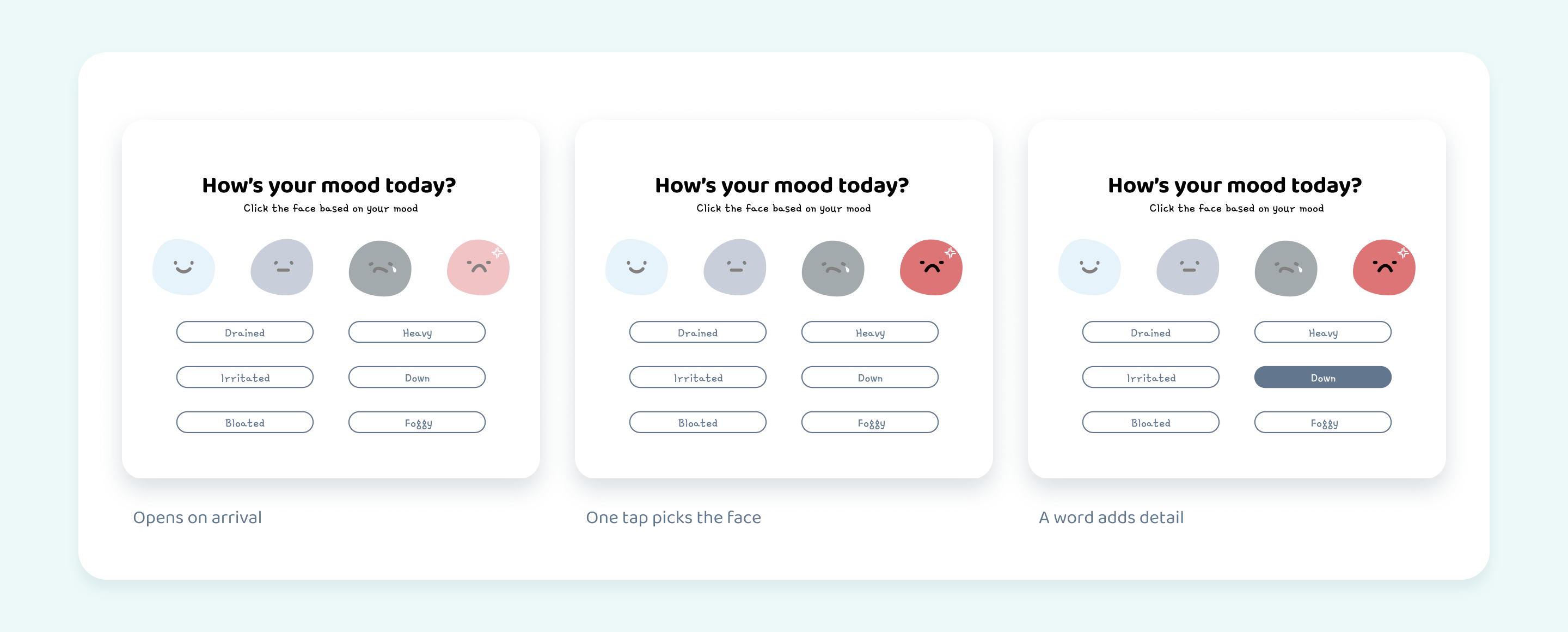
The mood popup opens over the home screen when you arrive. Four faces, then a row of word chips (drained, heavy, irritated, down, bloated, foggy) to say a bit more. It takes two taps and it blocks the screen until you answer, because the whole point of the app is that food suggestions depend on it. If mood were a setting buried in a menu, nobody would fill it in and the app would be just another meal list.
Make it feel like something you'd open every day, not a tracker.
The nutrition apps we compared looked like spreadsheets. I wanted PlanEat to feel closer to a mood diary that happens to suggest food, something a student would open every day even on days they didn't plan a meal.
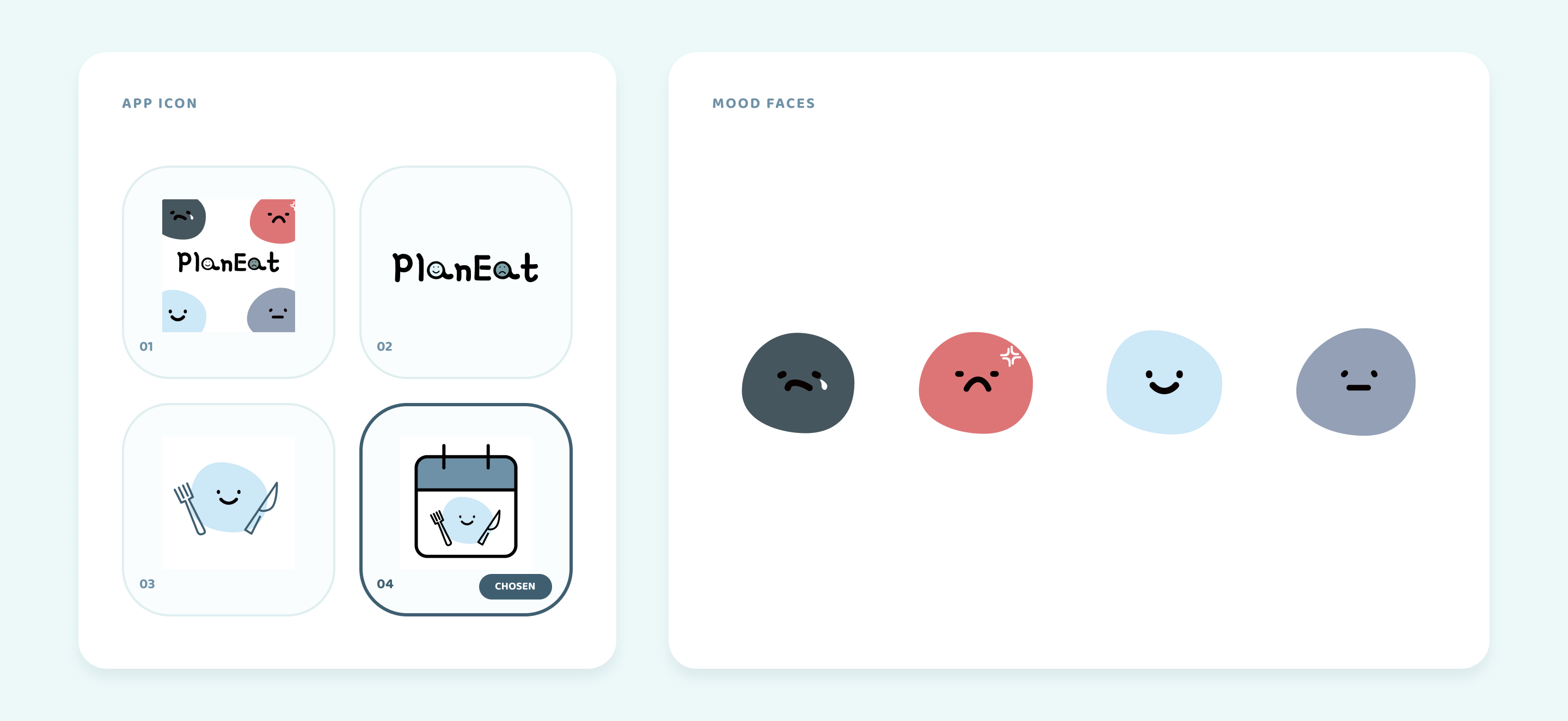
That is where the stone mascot came from: a small rounded character with a face that changes with your mood. It appears on the app icon, in the mood check-in, and next to each day's snack suggestion, so the app has one recurring face instead of a set of icons. The typefaces come from the same decision. Baloo Bhaijaan 2, rounded and plain, carries the whole interface, while Gamja Flower, the handwritten one, is kept for the wordmark and the mood labels. The palette is pale blue for the same reason. The app should feel friendly before it feels informative.

Build every screen myself in SwiftUI.
I designed about 20 screens in Figma (onboarding, login, sign-up, password reset, home, mood popup, calendar, meal history, settings, profile, language, support, log-out confirmation) and then built all of them in SwiftUI.
The account screens (sign-up, login, password reset, profile edit) run on Firebase Auth and Cloud Firestore that my teammates set up. My job on those was the front end: form validation, error messages, and making sure the flow felt like one app rather than a stack of forms.
Learning SwiftUI
It was my first time using SwiftUI. A teammate walked me through the basics, and I spent the first couple of weeks forgetting what he'd shown me and re-learning it from compiler errors. By the end I was turning my own Figma files into working screens without help.
View the full Figma screen map

03 / Results
- About 20 screens designed in Figma and built in SwiftUI, by one person, in three months
- 4 mood states, each changing that day's four meal suggestions
- Every meal card handles the photo not arriving, and caches the ones that do, so the demo still works with image generation switched off
- Code is public on GitHub: github.com/seyP0/PlanEat
We did not run user testing. Testing in this project meant one teammate building the back end, finding bugs in the front end, and me fixing them, over and over. The app has not shipped to the App Store, and the back end was finished by my teammates after my part was done.
What I learned
The hardest part had nothing to do with design or code. Three students with different class schedules and co-op terms cannot meet regularly, and for most of the project it was two of us doing the work while the third was away. I learned to leave the Figma file in a state someone else could pick up without me there to explain it, and to keep the front end building even when the back end was half done.
The second thing: designing the broken states first was the best call in the project, and I only made it because we were broke. I now put loading and failure states in the first pass of any interface, not the last.
Project links
SwiftUI front end, Firebase back end