Roomi
Revising six interactions in a roommate app after usability testing
Details
- Project
- Roomi, a shared-living app that helps roommates coordinate without awkward conversations
- Type
- Course project, University of Waterloo (team of five)
- Role
- Visual direction (colour, type, components), overall Figma structure, detail revisions across the hi-fi prototype, and turning the usability test findings into design fixes. I also ran one of the four user interviews and wrote the problem statement in the first milestone.
- Team
- Jimin Kim · Jade Sun · Andreea McKague · Cheryl Heung · Sally Kim
- Tools
- Figma, paper prototypes, cognitive walkthrough, usability testing
Overview
- The problem
- Interviewees avoided face-to-face conversations about house matters, and their messages often went unanswered.
- The decision
- We designed shared tasks, calendars and chat. I used the usability findings to revise event creation and five other interactions.
- What we made
- Six test findings led to changes in the final Figma prototype. Roomi was not built or released.
At a glanceSix usability findings, six design revisions, all from watching people use the prototype.
01 / Why we made it
Every one of us had a roommate story. A chore that never got done, a text that was read and ignored, a conversation about noise that fixed things for about a week. When we looked it up, the numbers matched the stories. Cleanliness and chores cause conflict for about 35% of students, noise for 27%, and the number of Canadians living with roommates has grown by more than half since 2001.
We interviewed four University of Waterloo students who were living with roommates at the time. The same pattern came up in every interview. People would rather text than talk face to face, so problems got raised by text, and texts got ignored. Nobody used a chore schedule or had agreed on quiet hours. Instead of fixing the problem, they changed their own habits to avoid the next argument.
From those interviews we wrote three personas and seven requirements. The four that shaped the app most were a place to message roommates about house matters, shared task and chore tracking, lifestyle profiles so boundaries are clear from the start, and custom notifications so a reminder does not have to come from a person.
Our users were university students in Canada, roughly 18 to 23, sharing a house or an apartment.

02 / What we decided, and why
Let an event start from the date.
- What the test showed
- Participants could not work out how to create an event during the usability test.
- Before
- Creating an event depended on finding the plus button.
- What I changed
- I added a second entry point: tap a date on the calendar to create an event.
- What this shows
- The prototype shows the added entry point. Follow-up task-completion results are not included.
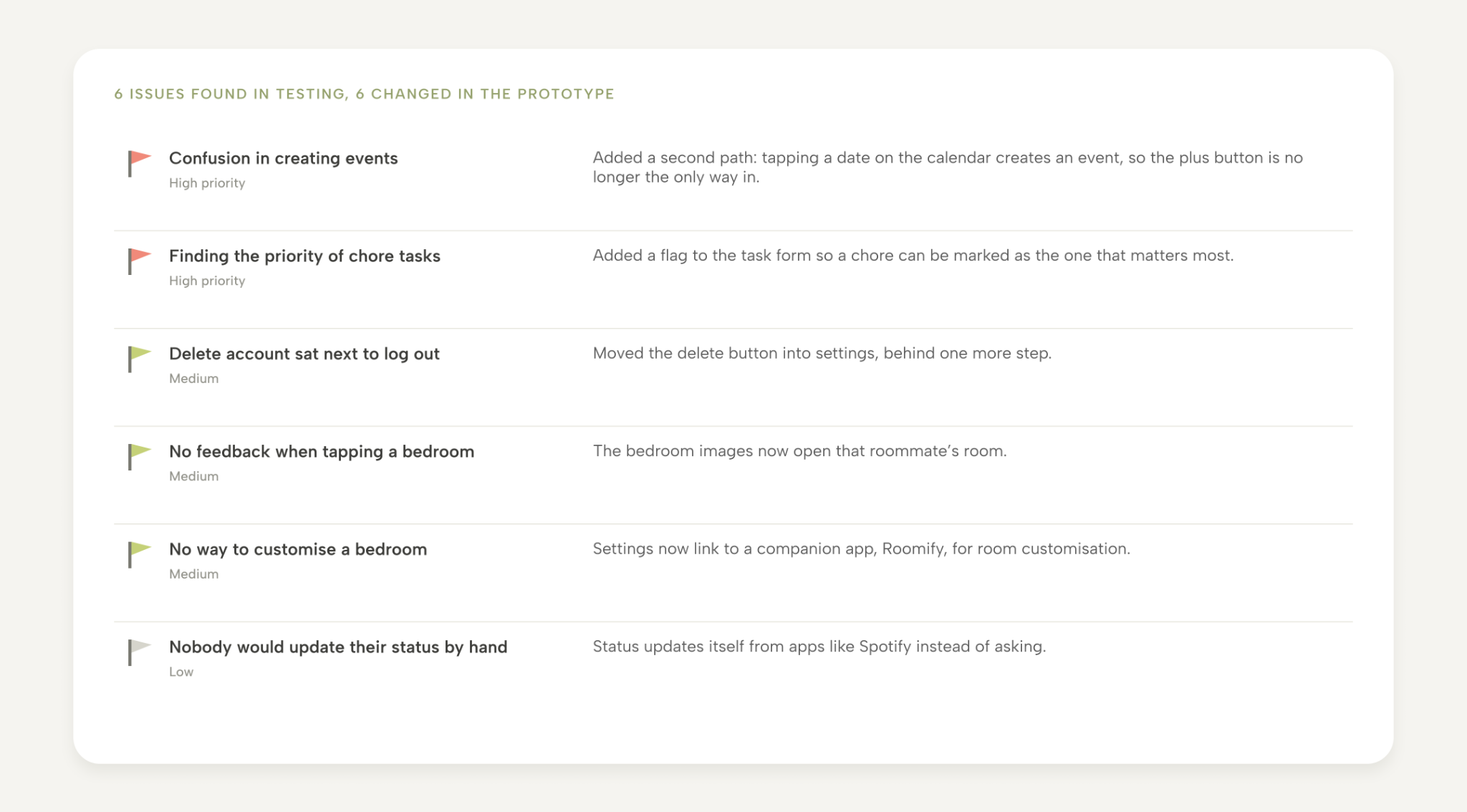
A teammate ran usability tests with second-year students from different universities, over video, thinking aloud through a set of tasks. I owned what happened next: turning the six findings into changes in the final prototype.
Two were high priority. Participants could not work out how to create an event, which is a core feature. I added a second path, tapping a date on the calendar, so you no longer need to find the plus button. And a participant asked for a way to show which chores matter most, so I added a flag to mark a task's priority.
The other four were smaller but each one changed something. The delete-account button sat next to log out, so it moved into settings. People kept tapping the bedroom images expecting something to happen, so the images now open the room. People said they would not bother updating their status by hand, so status now updates itself from apps like Spotify. And someone wondered aloud how to decorate their room, which became a link in settings to a companion app, Roomify, for room customisation.
View the full Figma screen map

Pick the room, not the pet.
We sketched three directions: a roommate-matching profile with lifestyle tags, a virtual pet that you feed by finishing chores, and an AI helper that drafts polite messages. Two of them became paper prototypes: the pet, and a shared "space" with a calendar, chat, reminders, and a room for each roommate. We tested both with a cognitive walkthrough.
The pet was fun, but it only worked for people who wanted a pet. The room concept let us keep the part of the pet idea that mattered, which was giving people a reason to open the app when nothing was wrong, and drop the part that narrowed the audience. We agreed on this early and never really argued about it. The AI helper did not disappear either. It became a chatbot inside the group chat.
The walkthrough also told us the paper version was confusing to use. Too many buttons, and onboarding did not explain what "Create space" or "Join space" meant. That went straight onto the list for the hi-fi version.

Make it feel like a home, not a task manager.
My main job on the hi-fi prototype was the visual direction. This is an app about the people you live with, so I did not want it to look like a to-do list. I chose a muted green and beige palette because it feels friendly and calm, which is the opposite of how most roommate conversations feel. The type and the components followed the same idea: rounded, soft, nothing that shouts.
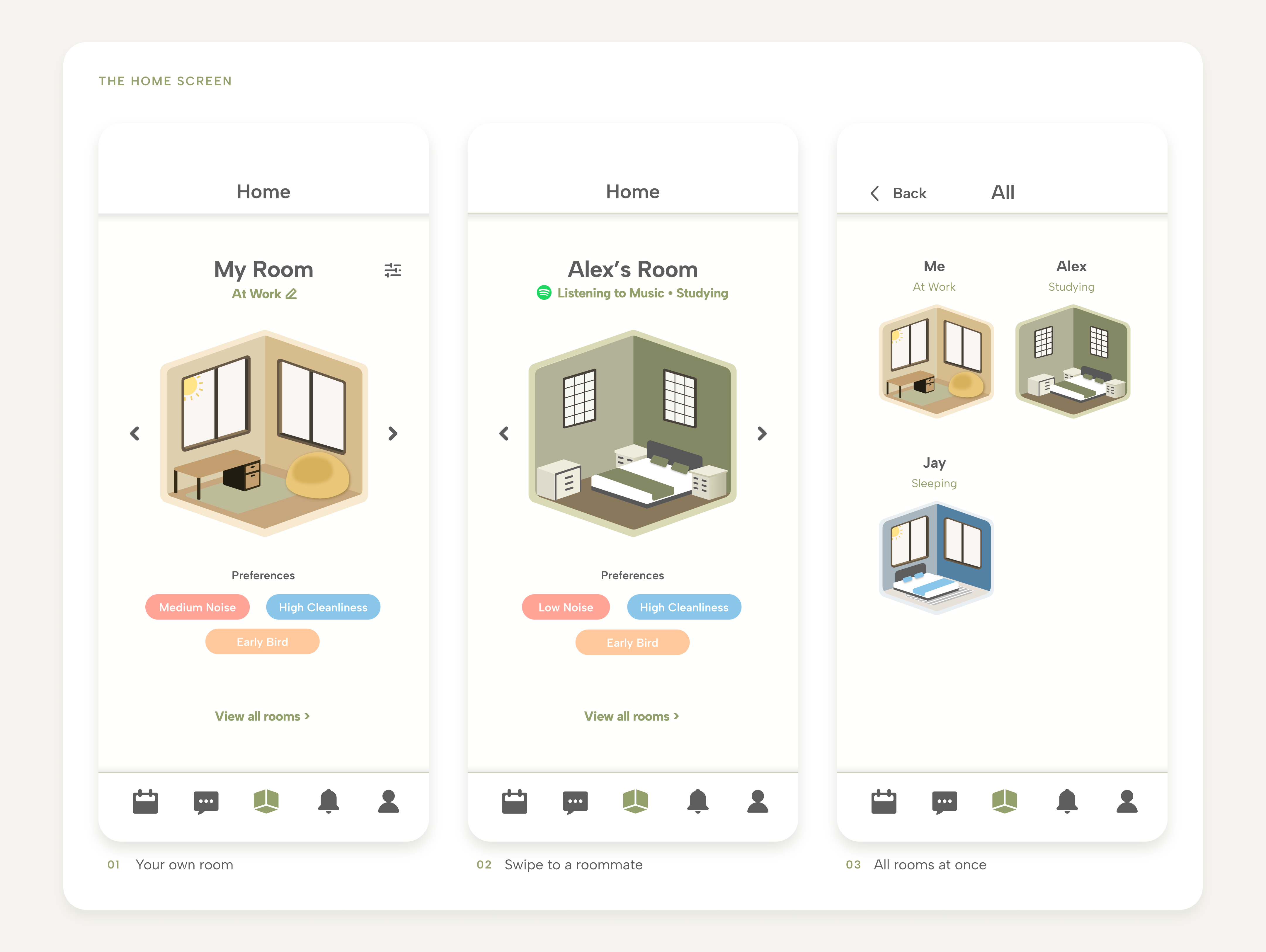
The home screen shows a small 3D room for each roommate, with their current status (studying, sleeping, out) and their lifestyle preferences underneath. A teammate drew the rooms. I set the frame around them: how the rooms sit on the screen, how you swipe between roommates, what the status and preference cards look like. The rooms are there for a reason beyond looking nice. They give people a reason to come back to the app on a normal day, so it is already open when the day is not normal.

Split the AI helper from the group chat.
In the sketches, the AI prompts and the group chat were one thing. In the hi-fi version we separated them. The group chat is where roommates talk, and the AI chatbot sits behind a robot icon in the corner of that chat. It offers three starter prompts (conflict resolution, setting boundaries, and so on) or takes your own question, and helps you word a message you are nervous about sending. Keeping the two apart meant the chat stayed a chat, and the helper was there when you needed it and invisible when you did not.

Build the rest on patterns people already know.
Tasks and events share one calendar. Each roommate has a colour, so a glance at the month shows whose event is whose. Creating a task and creating an event use the same form, with two Roomi-specific options: assign it to a roommate, and notify them. The notification board highlights anything urgent in red and puts the next action ("Mark as done", "View chat") right under the notification. The profile page has a metrics overview, with numbers like "75% of chores complete", so contributing to the house is visible instead of assumed.
None of these screens try to be clever. Calendar and task apps have trained everyone already, so we borrowed the patterns and spent our originality on the home screen and the chatbot.

03 / Results
- 4 interviews, 3 personas, 7 requirements, 2 paper prototypes, 1 hi-fi Figma prototype with 5 core features
- 6 usability issues found in testing (2 high priority), 6 design revisions in the final prototype
- Testers named the calendar and chat combination, the main navigation, and the overall simplicity as the strongest parts
Roomi is a prototype. It was never built or released, and I do not have usage numbers, only test results. The Spotify status integration and the Roomify companion app are design solutions in Figma, not working features.
What I learned
The hardest part was not any one screen. It was finding a visual direction that five people could agree on and that fit an app about living with other people. I learned to bring a palette and a few components to the group instead of a mood board, because a concrete thing gets useful feedback and a vague thing gets opinions.
The other lesson is about testing. Every one of the six issues came from watching someone use the prototype, and none of them were things we would have guessed. The event-creation problem in particular was invisible to us because we had built it.
If I did this again, I would want to make it real. A prototype can prove that people understand the app. It cannot prove that they would open it on a Tuesday when nothing is wrong, and that is the question Roomi was built to answer.